How to
How to ask Otto about your customers and records
The phone rings with a number you don't recognize. Someone asks how many customers you have of a certain type, whether Smith Hardware still owes on last month's invoice, or what the purchase order attached to a work order actually says. You could build a search for each one. Or you can ask Otto and get the answer in a few seconds, from the company you're working in, with links to the records behind it.
Before you start
- The company picker in the header shows the right company. Otto answers about that one only.
- Your login can read what you're asking about: customers, contacts, invoices. Otto asks as you.
- You have something to anchor the question: a name, a record number, a phone number or an email address.
Steps
Click Otto at the top right, next to the company picker. The panel opens on the right.
Type your question in the box. Name the record and say what you want back.
Press Enter, or click the send button. Working… lists each step as Otto takes it; Stop ends the run.

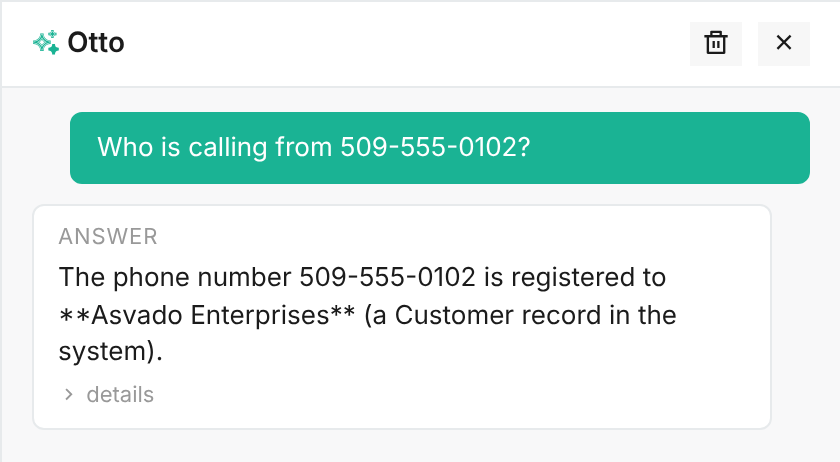
A phone number on the demo company, answered with the customer it belongs to. Read the Answer. A list comes back as a table: click a record number to open that quote, invoice, sales order, work order, purchase order or customer. Click details to see which lookups Otto ran.
Ask a follow-up if you need more. "And their email?" carries on from the last answer.
Click the bin icon to start a new conversation, or the X to close the panel.
Questions that work. Swap in your own names and numbers.
Finding who someone is:
- "Who is calling from 509-555-0142?" Dashes, spaces, brackets or +1 all work. Otto checks contacts, customers and employees, and a contact comes back with the customer it belongs to.
- "Whose email is accounts@example.com?" The address has to match exactly; capitals don't matter.
- "Take me to Smith Hardware." Otto answers with a link that opens the customer.
One customer:
- "What does Smith Hardware owe, and how late is it?" Otto answers from the aging report, so owed means open invoices, by how overdue they are.
- "Who is the account rep for Smith Hardware?"
- "Show me Smith Hardware's quotes." The quotes come back as a table you can click into.

Counts and lists:
- "How many active customers do we have?" A customer counts as active unless someone unticked Active on it.
- "Show me the five most recent invoices." Otto can sort, so "newest", "latest" and "oldest" work.
- "Which invoices are still unposted?"
- "Total invoiced per customer this year."
The record on your screen: open an invoice or work order, then ask "what's on this invoice?" or "who is the customer on this work order?". Otto knows which record you're looking at.
Files:
- "What does the PO attached to work order 4412 say?" Otto opens the file and answers from what it shows.
- Attach a file to your question with the paperclip, or paste a screenshot into the box, then ask about it: "Is this vendor already a supplier?"
Line items, in a company that codes money by BARS line item, fund or project:
- "What did we spend on 53400.47 this quarter?" or "Which payments haven't gone to the county yet?" More in how to ask Otto about your line items.
Short and specific beats long. Give the name, the number or the date range, and ask for one thing.
What posts behind it
Nothing. Asking a question only reads your records; no entry is written to the ledger. If what you ask for would change something, Otto shows an approval card instead and nothing changes until you approve it.
When it won’t let you
I couldn't finish in the allowed number of steps. Shown as Stopped. Otto ran out of steps for this question. Narrow it: name the customer, give a date range, or split it into two questions.
Do this in the UI: This operation is not available to AI callers; route it to the human UI. You asked Otto to do something that isn't open to it. Do it on the screen.
When nothing matches, Otto says so. An unknown phone number or email isn't an error; it just isn't in this company. Check the company picker before you decide the caller is new.
Some files are too big to read: images over 5 MB, PDFs over 10 MB or over 20 pages, and file types other than images, PDFs and text. Otto tells you which file it couldn't read and why; open that one in BasicBMS.
What this doesn't do
An invoice total isn't what's owed. When Otto lists invoices, the amount is each invoice's total before any payment. For what is still owed, ask about the customer, as in the example above.
A table holds up to 100 rows and links open quotes, invoices, sales orders, work orders, purchase orders, form templates and customers. Other records show as plain text.
Nothing carries over once the conversation ends. For a list you'll work through or run again next week, use a saved search.
Related
- What Otto can and can't do — what it can see, what it can change, and where it stops
- How to approve or decline a change Otto proposes — when a question turns into a change
- How to search a list and save the search — the list itself, filtered and saved
Stuck on this one? Call (509) 955-0770 and we'll walk through it with you.

Business software as unique as your business.
 Water Utility→
 Property Management→
 General Business→
 Construction soon
Don’t see yours? Build a vertical →
