
Fixes
A bookkeeper’s punch list
A customer’s bookkeeper reconciled their books in BasicBMS and wrote down every place the software got in the way. We worked the list in order. Most of it was ours to fix. One item wasn’t a bug at all: the software was doing the right thing and describing it badly, so the description is what changed.
Chart of accounts
Account pickers were sorted by type, not by number. Every account dropdown ordered the list by the account type’s name (Asset, Equity, Expense, Liability, Revenue) alphabetically, so the 3000s sat between the 1000s and the 5000s. They now sort by account number. One endpoint fed every picker, so one fix covered all of them.
You can type in every account field. The account dropdowns across the ledger, reconciliation, bills, invoices, GL defaults, payment-method mapping and deferrals (33 of them) are now a text box. Type 12 and you see the 12xx accounts. Type cash and it matches on the name. Arrow keys and Enter pick. It never saves free text, only an account you actually picked.
General ledger
“Draft” is now “Posted”. This was the item that wasn’t a bug. Every journal entry in BasicBMS posts the moment it is entered and counts in every report from then on. Closing a period only locks entries against edits. The ledger still labelled every unclosed entry Draft, in amber, which reads as “not posted yet.” Reading that label, the bookkeeper reasonably concluded the period had to be closed before reconciling could start. It never did. The label now reads Posted, the period bar counts entries as open and closed, and the Close Period confirmation says in plain words that closing changes nothing in the numbers.
Account numbers are links. In the ledger and in the chart of accounts, clicking an account number opens that account’s register: every entry that ever touched it, with a running balance down the page, signed the way the account normally reads. A bank account goes up on a deposit. A credit card goes up on a charge. The ledger toolbar gained an All time button that does the same thing for the selected account.
Bank reconciliation
Half-finished reconciliations are listed. Opening the reconcile screen used to show only a hint to pick an account. To get back into a month you’d started, you had to remember which account it was on. The landing view now lists every open statement period on every account, with its closing balance, difference and unfiled lines, and one click opens it. On one customer’s books that list held nine open periods across three accounts, each of which previously had to be found by hand.
You can un-clear from the cleared list. The tie-out’s “cleared this period” list showed what the software had marked cleared, with no way to disagree. Every row now has an Unclear button. If a statement line cleared the entry, you get the same undo as the worklist: a preview of what comes out, a confirmation, and the line goes back to Pending. If nothing links to it any more, only the cleared mark comes off. On the same customer’s books, 3 of 257 cleared entries had no line behind them. Before this change, nothing could un-clear those three.
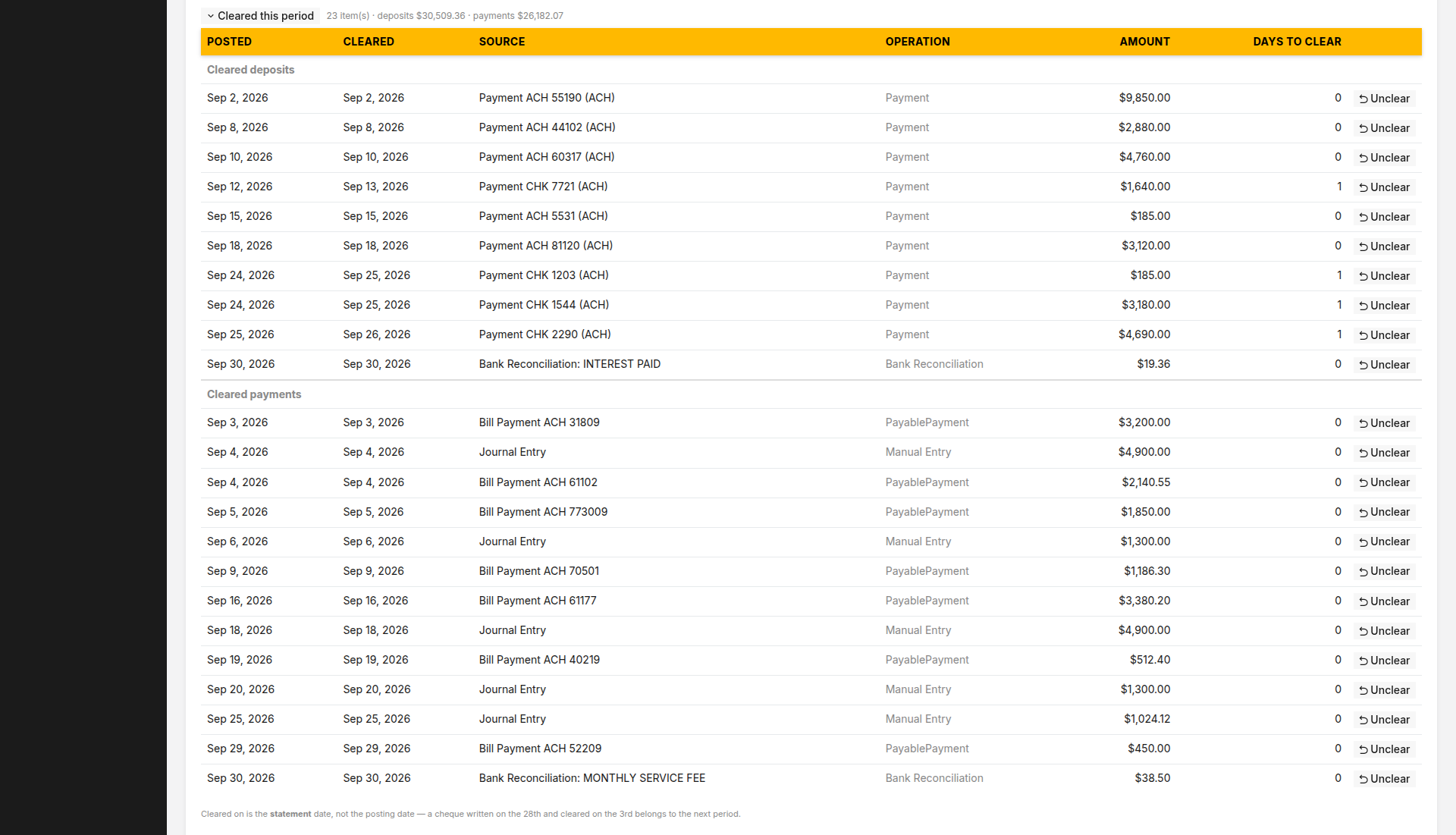
A reconciled period can’t be quietly undone. Undo was still offered on lines inside a period already marked reconciled. Using it would have moved the ledger balance out from under the period’s recorded zero difference without touching that record. Those lines now show a lock, the server refuses the undo, and the message says to reopen the period first. Reopen it and Undo comes back.
Undo made the line disappear until you reloaded. On the All view, undoing a filed line took it off the grid even though it was now pending. Refreshing the page brought it back. The grid now refetches after an undo.
You can correct a bank line’s description. The bank’s wording is rarely what the transaction was: “CUSTOMER WITHDRAWAL,” or a card processor’s merchant code. The only way to change it was to delete the line and re-import, and the import then refused the line as a duplicate. Payee and Memo are now editable in place, on both pending and filed lines. On a filed line, the ledger entries it posted are relabelled too, unless their period is closed. Amount, date and bank reference stay as the bank sent them.
The whole job, start to finish: How to reconcile a bank statement.
Card payments
The card surcharge came up 30¢ short on every payment. Stripe charges 2.9% plus 30¢ per transaction. The surcharge only recovered the 2.9%, and that formula was typed out separately in five places. It is now one formula, the percentage plus the fixed part, and the fixed part is a company setting (CCFeeFixed, default 0.30).
Not in this round
Batch filing still applies one supplier and one expense account to every selected line. Filing lines one at a time, each with its own account, has always worked (click the line), but a batch with per-line accounts is still open.

Business software as unique as your business.
 Water Utility→
 Property Management→
 General Business→
 Construction soon
Don’t see yours? Build a vertical →
