How to
How to list the checks and payments you sent out
The board wants a list of every payment made to vendors last month, with check numbers, to approve and file. Or a vendor calls to say a check never arrived and you need to know which one, for how much, and when. Check / Payment Register lists every bill payment in a date range, with the check or reference number, and totals by how it was paid.
Before you start
- You have the accounting administrator role. Without it the report's card doesn't show.
- Payments are recorded on the bills, with the check number or confirmation in Reference. The register shows what was typed there.
Steps
Open Reports. In the Receivables & Payables section, click Check / Payment Register.
The dates start at the current month. Set From: and To: to the dates paid you want.
Leave Tender: on All tenders, or pick one. The list only offers tenders actually used in that window, so it changes with the dates. Click the search (magnifier) button.
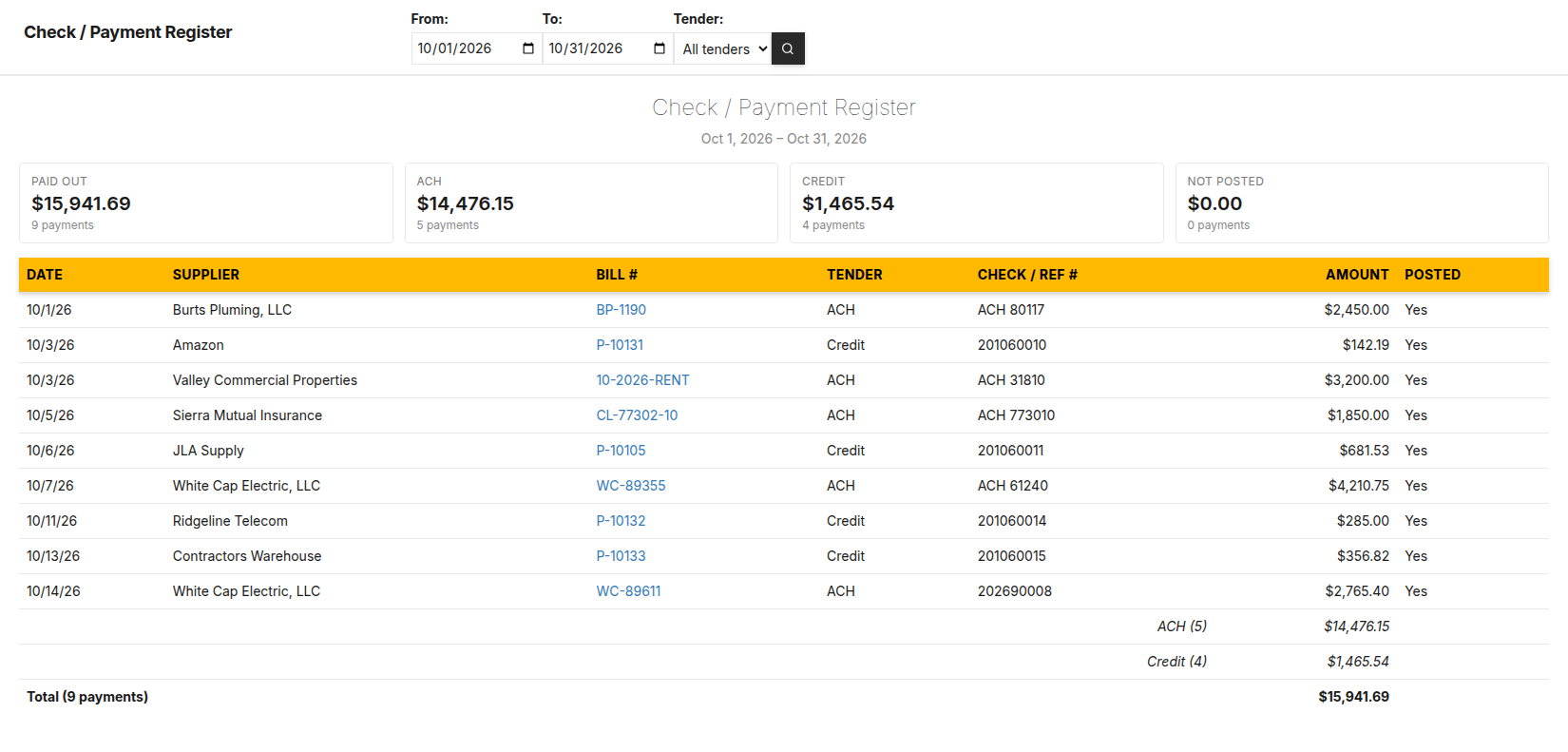
Read the tiles: Paid Out with the payment count, one tile each for your two largest tenders, and Not Posted, red when any payment hasn't posted.

October on the demo company: nine payments, a tile each for ACH and Credit, and a subtotal per tender above the total. Read the list: Date, Supplier, Bill #, Tender, Check / Ref #, Amount and Posted. It's sorted by date, then check number, then supplier.
At the foot, one subtotal per tender with its count, then Total and the number of payments.
Click a Bill # to open the bill a payment went against.
Print it for the board packet: top-bar pen menu → Print. When one tender is picked, the heading says so, for example "ACH only".
One check, two bills, two lines. The register has a line for each bill a payment was applied to. A single check that paid two bills shows twice, with the same check number on both. Add them together for the check amount.
Finding a check a vendor says never arrived. Set From: a little before the date you think it went out and To: today, pick the tender you record checks under, and search. Find the supplier in the list: the line gives you the date paid, the check number and the amount, and Bill # takes you to the bill it paid. Take that number to your bank or to reconciliation to see whether it cleared.
What posts behind it
Nothing. The report reads bill payments; it never writes an entry.
Posted is each payment's own flag. Yes means it reached the ledger; a red No means it hasn't yet. The Not Posted tile totals those. Chase them on the Unposted Items report, which is where anything waiting to post lives.
When it won’t let you
No bill payments in this window. Nothing paid to a vendor is dated in the period. Check the dates, and the tender if you picked one.
Tender shows (none). The payment was recorded without a tender. Tenders show exactly as they were recorded. Your company sets the list (commonly ACH, Cash and Credit), and older payments may carry older labels, so you may see more than you'd expect.
What this doesn't do
It doesn't print or void checks. It doesn't know whether a check has cleared the bank; that's reconciliation. Customer payments aren't on it, only money paid out to suppliers; for money coming in, use the Payments Received report.
Related
- How to plan which bills to pay this week — before the payments go out
- How to reconcile a bank statement — to see what has cleared
- Supplier payables in BasicBMS
Stuck on this one? Call (509) 955-0770 and we'll walk through it with you.

Business software as unique as your business.
 Water Utility→
 Property Management→
 General Business→
 Construction soon
Don’t see yours? Build a vertical →
