How to
How to send base charges and usage to different revenue accounts
The budget tracks water revenue in pieces: residential base charges in one account, commercial base charges in another, usage fees in a third, septic in a fourth. If every line of every water bill posts to one sales account, somebody reclasses it by hand at month-end, and the board's report is only as good as that spreadsheet. In BasicBMS each row of a Tiered rate can name its own revenue account. Set it once on the rate and every bill splits itself when it posts.
Before you start
- The revenue accounts exist in your chart of accounts. The picker lists accounts numbered in the 4000s; if your chart numbers revenue some other way, it lists every account.
- The rate is Tiered (see how to enter a utility rate sheet). The GL account column is only in the Tiered editor.
- Decide the mapping before you start. The examples here use 4010 Base Charges – Residential, 4011 Base Charges – Commercial, 4020 Water Usage Fees and 4030 Septic Fees. Use your own.
Steps
Open the residential rate item from Inventory → Management and click Add under Price History. The editor opens filled in with the rate in force, so nothing is retyped.
On the fixed charge row, pick the rate class's account in GL account: 4010 Base Charges – Residential.
On each usage block, pick 4020 Water Usage Fees. The $0 included block can stay as it is; a $0 line posts nothing.
Leave any row on Item's account to keep posting it where it posted before.

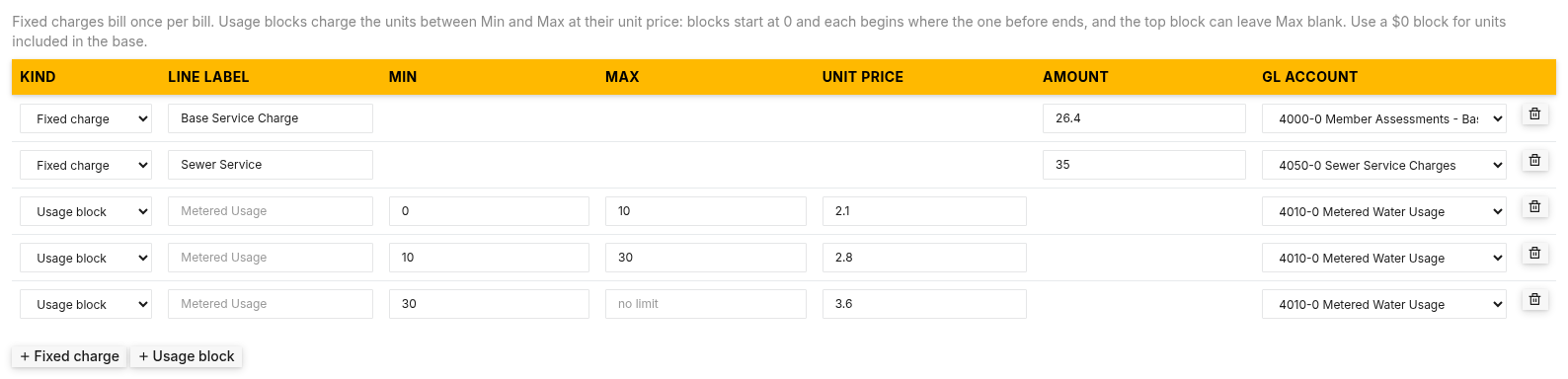
Each row names its own account on the Silver Creek demo district: the base charge to 4000-0 Member Assessments, sewer to 4050-0 Sewer Service Charges, and every usage block to 4010-0 Metered Water Usage. Click Save. The app says
Rate saved.The accounts are saved with the rate, and the next time you click Add they come back with everything else.Repeat for each rate class, giving its fixed charge the class's own account: 4011 on the commercial rate, and so on. Usage blocks on every class can share 4020.
Do the same on add-on items. Open Septic Service, click Add, pick 4030 Septic Fees on its fixed charge and Save.
Linked rates share accounts. An item with a Linked price bills the rows of the item it links to, accounts included. That's what you want when classes truly share a rate. When two classes share tiers but book their base charges to different accounts, give each its own Tiered set.
From the next bill on. A bill takes its accounts when it's made. Bills already made keep theirs, so set the accounts before a run, not after.
Line item codes. If your company also codes revenue by a dimension (a BARS line item, a fund), each of these lines takes its row's revenue account's code (give each GL account its usual code). A default code on the rate item itself wins over every row's account, so leave the item's picker on "None — use the revenue account's code" when base and usage belong under different codes (give an item its usual code).
What posts behind it
A residential point, 28,000 gallons, with septic: $353.58. Each line credits its row's account:
| Account | Debit | Credit | |
|---|---|---|---|
| DR | Accounts Receivable | 353.58 | — |
| CR | 4010 Base Charges – Residential (Basic Monthly Service) | — | 101.35 |
| CR | 4020 Water Usage Fees (34.13 + 96.85) | — | 130.98 |
| CR | 4030 Septic Fees (Septic Service) | — | 121.25 |
| Balanced | 353.58 | 353.58 |
A row left on Item's account credits the account the item's lines always used: the Inventory Sales account in GL Defaults, unless the item has its own. Changing a rate's accounts posts nothing by itself.
When it won’t let you
A GL account on this rate isn't in this company's chart of accounts. A row points at an account the company doesn't have, usually one deleted since the rate was last saved. Pick the account again on that row, or set it back to Item's account, and save. The rate's other checks, gaps and overlaps between blocks, still apply; they're listed in how to enter a utility rate sheet.
What this doesn't do
One-off fee items, such as a hook-up fee or a returned-check fee, can't carry their own revenue account yet. On a manual invoice they post to the default sales account. Accounts are set per row on Tiered rates only; the older single-row price styles have no GL account column. One bill line credits one account, so a single block can't be split between two. And it doesn't touch bills already made: a reclass of past bills is a journal entry, not a rate change.
Related
Stuck on this one? Call (509) 955-0770 and we'll walk through it with you.

Business software as unique as your business.
 Water Utility→
 Property Management→
 General Business→
 Construction soon
Don’t see yours? Build a vertical →
