How to
How to enter a utility rate sheet (base, tiers per 1,000 gallons)
The board adopted a new rate sheet, and it reads like most rate sheets: a basic monthly service charge, the first 7,500 gallons included, then a price per 1,000 gallons that steps up as usage climbs. The job is to get that sheet into BasicBMS so the software's bill matches a bill worked by hand, to the penny. You don't convert the prices. If your meters read in thousands of gallons, the sheet goes in as written, as one Tiered rate. This guide is the translation: which number on the sheet goes in which box. The editor itself is covered in how to set up a water rate (linked below).
Before you start
- The rate sheet, with every charge for the rate class you're entering.
- A rate item for the class, made from the Rate template under Inventory → Management. One item per rate class.
- The meters on these service points have Unit of Measure set to kGal. The unit printed on a bill comes from the meter, so the rate and the meter have to agree (see step 2).
- Optional: the revenue accounts your budget uses for base charges and for usage (see the revenue accounts guide, linked below).
Steps
Open the rate item and click Add under Price History. The editor opens filled in with the rate in force, if there is one.
Set Style: to Tiered and Unit of Measure: to kGal. With kGal, a sheet price of "$4.55 per 1,000 gallons" is entered as 4.55, and a band of "7,500 to 15,000 gallons" is 7.5 to 15.
Click + Fixed charge. Type the sheet's own wording in Line label, such as Basic Monthly Service, and the charge in Amount: 101.35. The label is what the customer reads on the bill.
Click + Usage block for the included water: Min 0, Max 7.5, Unit Price 0. A $0 block is how "the first 7,500 gallons included" is written.
Click + Usage block for each step on the sheet. Each new block starts where the last one ended, so you only type its Max and Unit Price: 15 at 4.55, then 45 at 7.45.
Add the top block at 10.65 and leave Max blank. It reads no limit.
Leave GL account on Item's account, or pick a revenue account per row now.

A commercial rate entered on the Silver Creek demo district. That district reads meters in CCF, so its blocks are in CCF (0 to 10, 10 to 30, 30 and up) rather than thousands of gallons. Click Save. The app says
Rate saved.and the set becomes the top row of Price History.Under Preview:, type 28 in Units used and click What would this bill? The preview prices the saved rate, line by line, with the same code that prices bills. Pull an old bill for the same usage and compare.
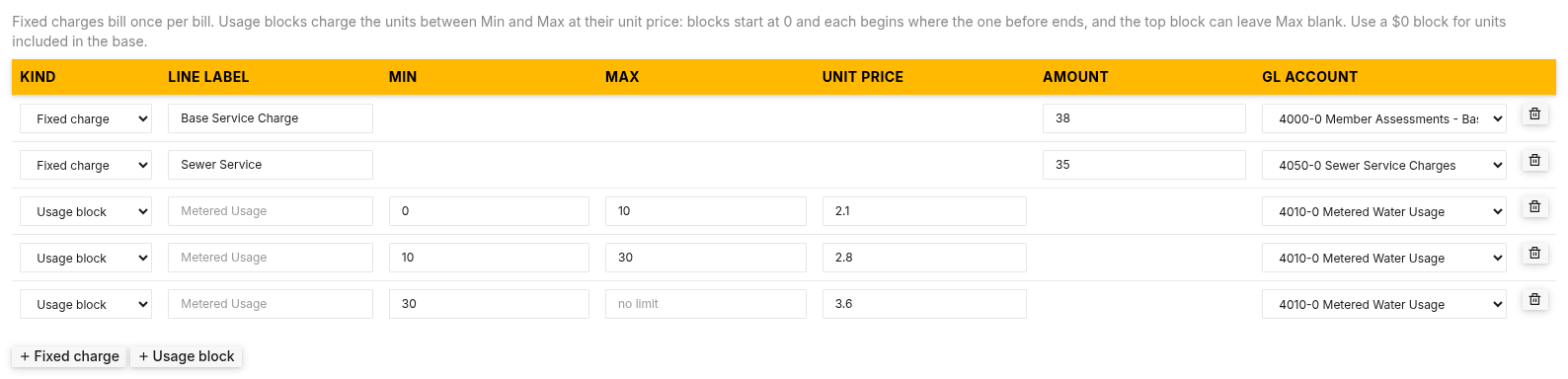
The sheet, row by row.
| On the rate sheet | In the editor |
|---|---|
| Basic Monthly Service, $101.35 | Fixed charge · Amount 101.35 |
| First 7,500 gallons included | Usage block · Min 0 · Max 7.5 · Unit Price 0 |
| 7,500 to 15,000 gallons, $4.55 per 1,000 | Usage block · 7.5 to 15 · 4.55 |
| 15,000 to 45,000 gallons, $7.45 per 1,000 | Usage block · 15 to 45 · 7.45 |
| Over 45,000 gallons, $10.65 per 1,000 | Usage block · 45 to blank · 10.65 |
What 28,000 gallons bills. Each block charges only the units inside it, and each usage line prints the meter span so the customer can check it:
| Line | Detail | Amount |
|---|---|---|
| Basic Monthly Service | Water Service | 101.35 |
| Metered Usage (0–7.5 kGal) | 7.5 kGal @ $0.00/kGal · meter 1,698 → 1,726 | 0.00 |
| Metered Usage (7.5–15 kGal) | 7.5 kGal @ $4.55/kGal · meter 1,698 → 1,726 | 34.13 |
| Metered Usage (15–45 kGal) | 13 kGal @ $7.45/kGal · meter 1,698 → 1,726 | 96.85 |
| Total | 232.33 |
A block you give a Line label prints that label instead of Metered Usage (…). Money rounds half up, the way you'd round by hand: 7.5 × $4.55 is $34.125, and it bills as $34.13.
If your meters read in gallons. Enter the sheet in gallons instead: bands of 7500, 15000 and 45000, and prices per gallon, so $4.55 per 1,000 is 0.00455. It bills the same total and prints as 7500 gal @ $0.00455/gal. What you can't do is mix them. A rate entered in thousands on a meter that reads in gallons puts 28,000 gallons in the top block, and the bill is roughly a thousand times too big. The preview won't catch that, because it uses the rate's unit, not the meter's.
What posts behind it
Saving a rate posts nothing. When a bill priced on it posts, the $232.33 above goes:
| Account | Debit | Credit | |
|---|---|---|---|
| DR | Accounts Receivable | 232.33 | — |
| CR | Each row's GL account (on Item's account: GL Defaults Inventory Sales) | — | 232.33 |
| Balanced | 232.33 | 232.33 |
Give the fixed charge and the usage blocks different accounts and the credit splits across them. The $0 included line posts nothing.
When it won’t let you
Usage blocks leave a gap from 7.5 to 7.501, so those units would bill nothing. Add a $0 block if they should be free. Rate sheets often print bands as "7,501 to 15,000 gallons". Enter that band as 7.5 to 15. Each block starts exactly where the one before it ends; the units above 7.5 fall in the next block.
Row 2: a usage block needs a unit price ($0 or more). The included block was left blank. Type 0 in Unit Price.
Row 3: the block's maximum must be more than its minimum. Usually a slip in the thousands, such as 15 to 4.5 where the sheet says 45. Rows count from the top, fixed charges included. The numbers in these messages are examples; the app fills in yours.
What this doesn't do
There's no effective date: a rate applies from the moment you save it, so enter a new sheet on the day it takes effect. A charge that some connections pay and others don't, such as septic, isn't part of the rate; it's an add-on on the service point. A rate sheet that charges "per ERU" is handled by the ERUs number on the point, not by a separate rate. Both are linked below. Two meters on one account bill as two service points, each with its own base charge.
Related
Stuck on this one? Call (509) 955-0770 and we'll walk through it with you.

Business software as unique as your business.
 Water Utility→
 Property Management→
 General Business→
 Construction soon
Don’t see yours? Build a vertical →
