How to
How to bill a year up front and recognize it month by month
A customer pays for a year of service on one invoice: twelve months of a service agreement, a year of hosting, an annual support plan. On the invoice date you have the money (or the receivable), but you have not earned it yet. You earn it a month at a time as you deliver the service. If the whole year lands in revenue the day the invoice posts, that month looks enormous and the next eleven look empty.
Mark the line Recognize over 12 months. When the invoice posts, the line goes to Deferred Revenue instead of revenue, and BasicBMS sets up a twelve-month schedule that moves one month's share into the line's own revenue account at each month-end. The customer gets the same single invoice either way.
Before you start
- GL Defaults has a Deferred Revenue account (Company settings). Without one, the invoice won't post and tells you so.
- The invoice has a Sold To customer. A deferred balance always belongs to a customer.
- The line is coded to the revenue account it should end up in, such as Service Contract Revenue. That account stays on the line; Deferred Revenue is only where it waits.
- Build-out work or one-time charges on the same invoice are not marked. They post to revenue as they always have.
Steps
Open the invoice and switch the item list to Edit.
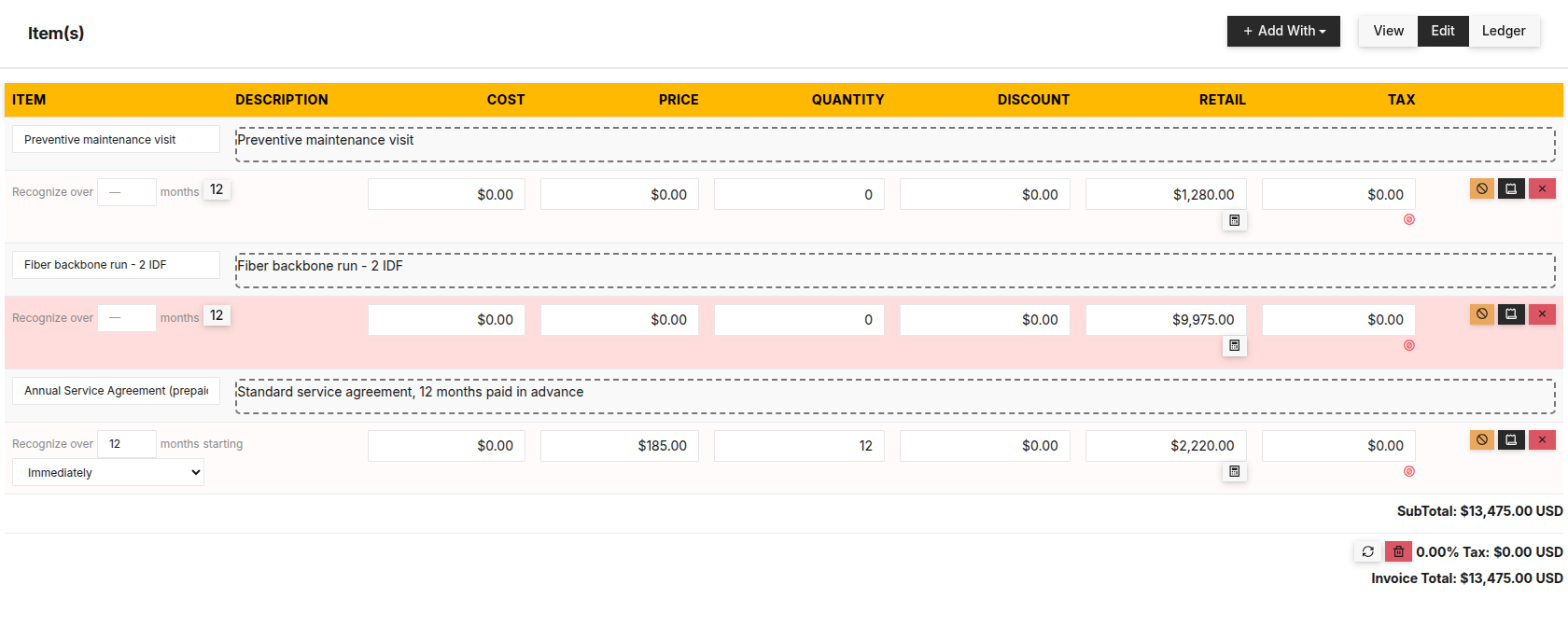
Find the subscription line. Under its name, in Recognize over, enter the number of months the service covers. 12 is a one-click shortcut.
Leave starting on Immediately. That starts the schedule in the invoice's month, which is what you want for a renewal or any customer already receiving the service.

Only the subscription line is marked. The other lines on the invoice post to revenue as usual. Post the invoice as usual: Ledger view → Post to Ledger. If it was already posted, click Re-post. The entry is rebuilt with the line in Deferred Revenue and the schedule is created in the same step.
Back in View, the line carries a small Deferred · 12 mo label. It is for your team only and never prints on the customer's invoice.

The label is for your team. It never prints on the customer's invoice. Open Accounting → Deferrals. The line is listed with the invoice number under Source, the customer, the original amount and the next month due. Click the row to see all twelve months.

The schedule runs from the start month whether or not the customer has paid. An unpaid invoice sits in Accounts Receivable and the unearned service sits in Deferred Revenue. Both are true at once, and paying the invoice doesn't change either schedule.
Renewals defer themselves. If the invoice comes from a recurring template, set the months on the template line once. Every renewal copies them and starts immediately, so next year's invoice is deferred without anyone touching it.
What posts behind it
On a $2,220 annual service agreement (12 × $185), the invoice posts:
| Account | Debit | Credit | |
|---|---|---|---|
| DR | Accounts Receivable | 2,220.00 | — |
| CR | Deferred Revenue | — | 2,220.00 |
| Balanced | 2,220.00 | 2,220.00 |
Then each month, when you release it (see the related guide):
| Account | Debit | Credit | |
|---|---|---|---|
| DR | Deferred Revenue | 185.00 | — |
| CR | Service Contract Revenue | — | 185.00 |
| Balanced | 185.00 | 185.00 |
Sales tax on the line is not deferred. It posts to Sales Tax Payable on the invoice, as usual.
When it won’t let you
Cannot post — assign a GL account to each of these first: Deferred Revenue (GL Defaults). No Deferred Revenue account is set. Pick one in GL Defaults, then post again.
Cannot post — a deferred line needs a Sold To customer on the invoice. Add the customer to Sold To and post again.
Cannot post — 'Annual Service Agreement' already has 3 released month(s) on its deferral — stop that deferral (Accounting → Deferrals) before changing this line. You changed the amount, the months or the account on a line whose schedule has already released revenue. Undo the change, or stop the old schedule first in Deferrals.
Deferred revenue has already been released from I-100038 · Annual Service Agreement. Stop that deferral (Accounting → Deferrals) before deleting. The same protection on delete. A line or invoice with no released months deletes normally, and its schedule goes with it.
What this doesn't do
It does not send the customer anything. The monthly releases are internal journal entries: no invoice, receipt or email. It does not release months on its own either; a person releases what is due, usually once at month-end. It defers whole months starting on the first of the start month, not partial days. And it never looks at whether the invoice is paid.
Related
- How to start a subscription when the project goes live — when the service begins after the build
- How to release deferred revenue at month-end — the monthly click
- Why a customer prepayment isn't a negative receivable — the other kind of deferred revenue
Stuck on this one? Call (509) 955-0770 and we'll walk through it with you.

Business software as unique as your business.
 Water Utility→
 Property Management→
 General Business→
 Construction soon
Don’t see yours? Build a vertical →
