How to
How to start a subscription when the project goes live
One invoice carries two different things: the installation (or the website build, or the setup) and the first year of service that follows it. The build is earned as you do the work. The year of service hasn't started yet. It starts when the job is finished, and on the day you send the invoice you may not know when that will be.
Mark the service line When the project completes. The invoice posts the year to Deferred Revenue and parks it there, with no schedule yet. When the job goes live, you press Start with the date, and the twelve months begin from that month.
Before you start
- Everything in How to bill a year up front and recognize it month by month applies: a Deferred Revenue account in GL Defaults, a Sold To customer, and the line coded to the revenue account it ends up in.
- Only the service line is marked. The build line on the same invoice is left alone and posts to revenue as usual.
- Starting a deferral needs the deferral administrator permission.
Steps
Open the invoice and switch the item list to Edit.
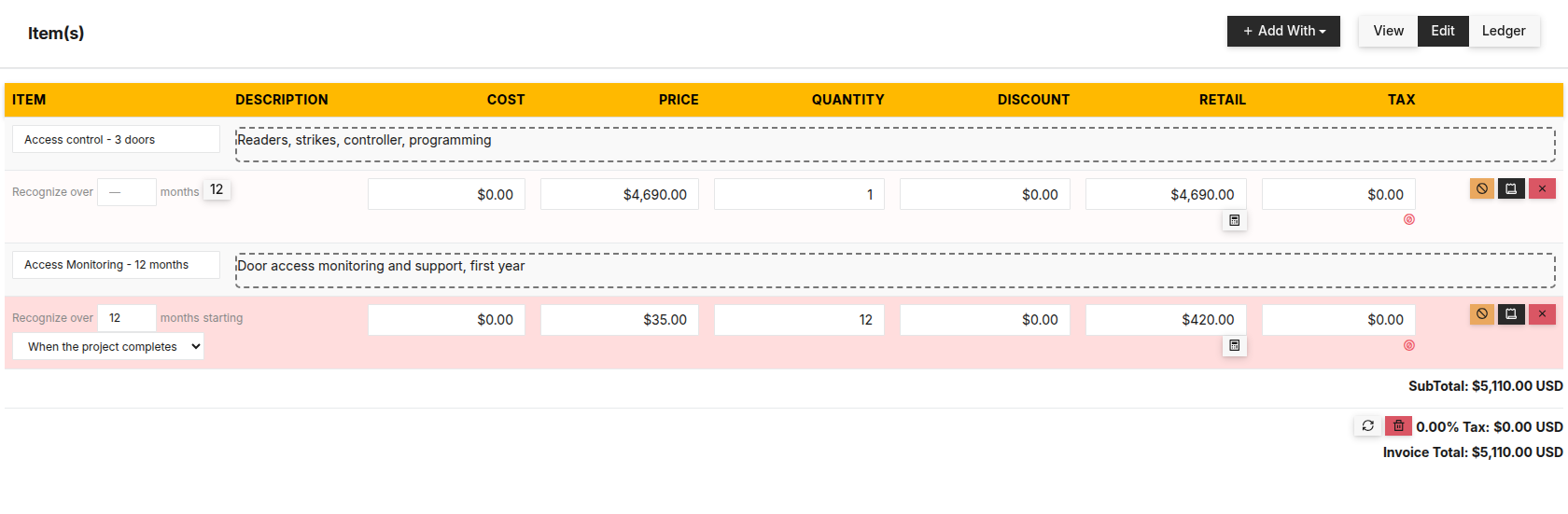
On the service line, enter the months in Recognize over and set starting to When the project completes.

The installation earns revenue now. The year of monitoring waits for the go-live date. Post the invoice (Ledger → Post to Ledger, or Re-post). The service line's amount goes to Deferred Revenue. The build line goes to revenue.
In Accounting → Deferrals, the line shows Awaiting start. It stays on the default Open filter, and Unposted Items lists it too, so it can't be forgotten.
When the project goes live, click the row, enter the date in Service began and click Start.

Enter the day the service began and press Start. Months already past are due at the next release. Confirm. The schedule is built from the first of that month. If the date is in the past, the months already gone by are simply due, and the next Release due posts them.

Already know the go-live date? Pick On a date instead and enter it. The schedule is built when the invoice posts, starting that month, and there is nothing to press later.
Renewals don't wait. Next year's renewal invoice starts immediately, whatever the first year was set to. The go-live date is a one-time thing.
What posts behind it
A $2,000 website build and $300 for the first year of hosting on one invoice:
| Account | Debit | Credit | |
|---|---|---|---|
| DR | Accounts Receivable | 2,300.00 | — |
| CR | Website Revenue (the build) | — | 2,000.00 |
| CR | Deferred Revenue (the hosting, waiting) | — | 300.00 |
| Balanced | 2,300.00 | 2,300.00 |
Nothing more posts until you press Start. From then on, each month you release moves $25.00 from Deferred Revenue to the hosting revenue account.
When it won’t let you
Only a deferral awaiting its start can be started — this one is active. It has already been started, or it was never waiting. Its schedule is in the row.
Cannot post — 'Web Hosting' is set to start on a date, but no date is set. The line says On a date without a date. Enter it or pick another start option.
What this doesn't do
It doesn't watch the project. Nothing starts until a person enters the go-live date. It doesn't tell the customer anything, and it doesn't change when the customer is billed: the invoice is the same single invoice either way.
Related
Stuck on this one? Call (509) 955-0770 and we'll walk through it with you.

Business software as unique as your business.
 Water Utility→
 Property Management→
 General Business→
 Construction soon
Don’t see yours? Build a vertical →
