Learning
What "balance forward" means on a BasicBMS bill
A member skipped last quarter. This quarter's bill says $150, they pay $150, and they think they are square — when they owe $300. A bill has to show the whole picture: what is still owed from before, what is new, and the one number to pay. The question is how to get that number onto paper without wrecking your books.
Before you start
- The invoice layout has the Account Summary section. Add it once to the invoice template in the form builder, after the item list and before Payments; every bill generated from that template carries it.
- Nothing else. The summary is read from bills and payments you already have.
How it works in BasicBMS
Two ways to forward a balance. One is to close the old bill and copy what was owed onto the new one as a line called "previous balance." Plenty of systems do this. It looks tidy and it quietly breaks four things: the old bill reads Paid when no money came in; the aging report shows a quarter-old debt as current, because it now lives on a bill dated today; you can no longer tell which bill was late, so a late fee has nothing honest to point at; and when a backdated check turns up, you are unwinding a transfer instead of applying a payment.
BasicBMS does the other thing. Every bill stays open on its own until it is paid — that is what accountants call open-item. The previous balance is never a line on the new bill. It is shown, not booked, in an Account Summary under the charges:
| Line | What it is |
|---|---|
| Previous balance | What the customer owed on all bills as of their last bill |
| Payments received — thank you | Payments dated since that bill |
| Adjustments | Anything else that moved it — a credit, a waiver. Usually hidden, because it is zero |
| Balance forward | Still owed on earlier bills, each one listed with its due date and days past due |
| Current charges | This bill |
| Late fees | Any late fee on this bill |
| Credits applied | Prepayment drawn down when this bill posted, or a payment made before it |
| TOTAL AMOUNT DUE | Balance forward plus this bill, less credits |
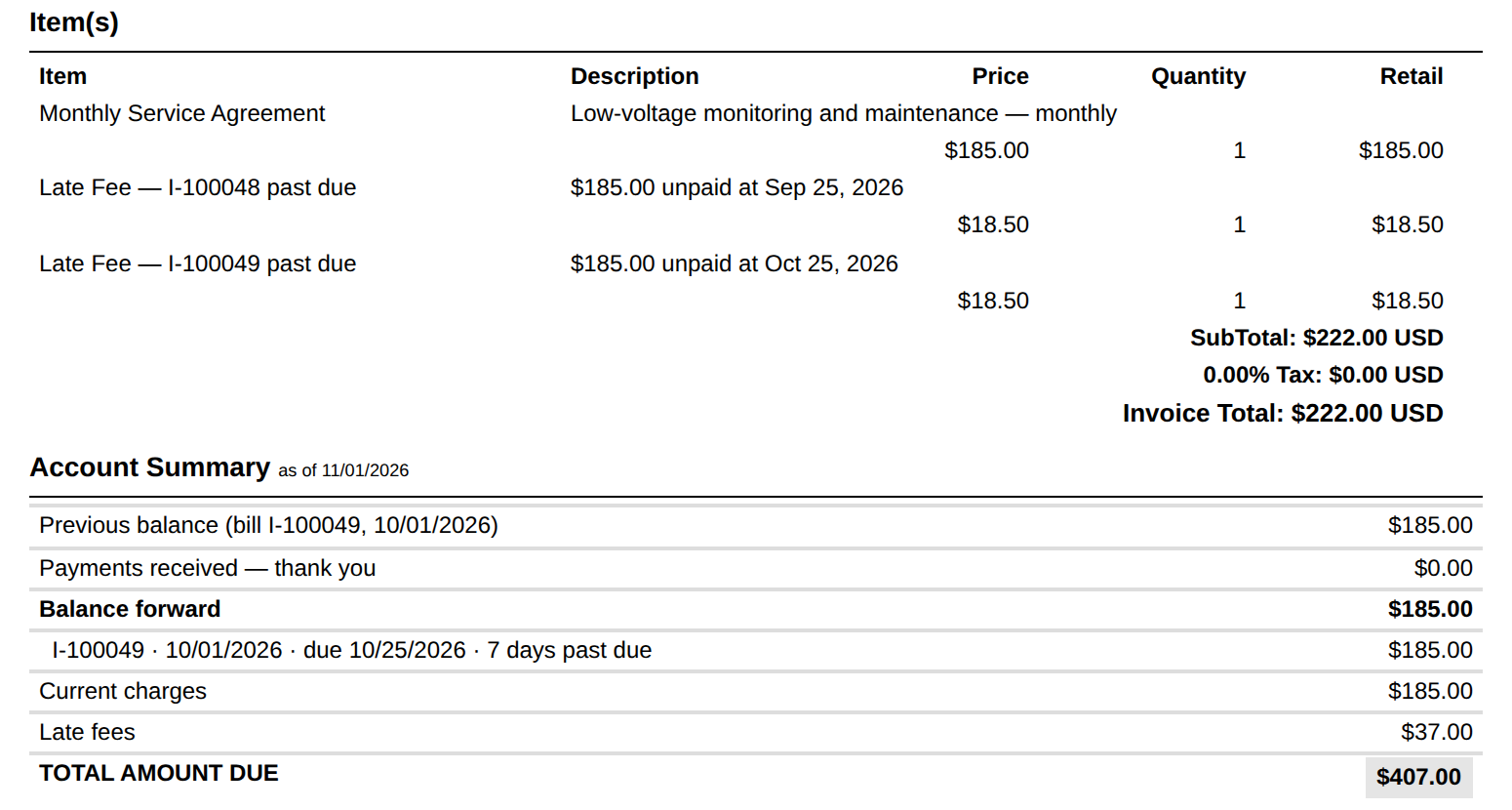
Everything in it is worked out as of the bill's date, so a reprint next month reads the same as the paper you mailed — unless someone has since entered a payment dated before the bill, in which case it should change. On screen there is one extra, live line: what the customer owes right now, if it differs.
Paying the total. The member writes one check for the Total Amount Due. When it is matched in bank reconciliation, it is split across the open bills it covers — one ordinary payment per bill, so each bill is paid off on its own. Online, a company can choose for the card link to collect the whole balance too; that payment is split oldest bill first when the money arrives.
What posts behind it
Nothing. The account summary is presentation. The only entries are the ones that were always there: each bill posts its own charges when it is issued, and each payment relieves the bill it is applied to. A $150 bill carried forward is still $150 in Accounts Receivable on the bill that created it — never $150 twice.
When it won’t let you
There are no refusals here; the summary only reads. If it looks wrong:
It shows a balance the customer says they paid. The payment is not in BasicBMS yet, or it is dated after the bill. Record or reconcile it and the summary follows.
A bill carried a "previous balance" line before this existed. Leave those bills as they are. From now on, don't add one — the summary would show that money twice: once as the line, once as the open bill.
What this doesn’t do
It is not a statement run. There is no separate monthly statement for customers who weren't billed this cycle; the summary rides on the bill. It does not close or write off anything — for bad debt, that is still a deliberate adjustment. And the card link on a single bill collects that bill only unless the company has chosen to collect the whole balance online.
Related
- How to set up late fees on recurring bills — the fee shown on the Late fees line
- How to waive a late fee
- One Deposit. Three Invoices. — where a total-due check gets split in reconciliation
Questions? Call (509) 949-2162.

Business software as unique as your business.
 Water Utility→
 Property Management→
 General Business→
 Construction soon
Don’t see yours? Build a vertical →
