How to
How to waive a late fee
The member called. The check was in the mail before the due date, the post office sat on it, and you are not going to argue over fifteen dollars. Waiving takes the fee line off the bill it was charged on, re-posts that bill without it, and keeps a note of who waived it and why.
Before you start
- The fee is still on the bill — it shows as Charged in the list.
- The bill's ledger entry is not in a closed period.
- The fee has not already been paid. If it has, this is a refund or a credit, not a waiver.
- You are a billing administrator.
Steps
Open Billing → Dashboard → Late Fees. Scroll to Late fees charged. Each row shows the late bill, its due date, the bill the fee is On, and the amount. (Or open the bill itself: its Account Summary lists Late fees on this bill with the same Waive link.)
Click Waive on the row.
In Waive late fee, type the reason in Reason (required). The Waive fee button stays disabled until you do.

The reason is required and kept with the fee. Click Waive fee. The row now shows Waived; hover it to see the reason.
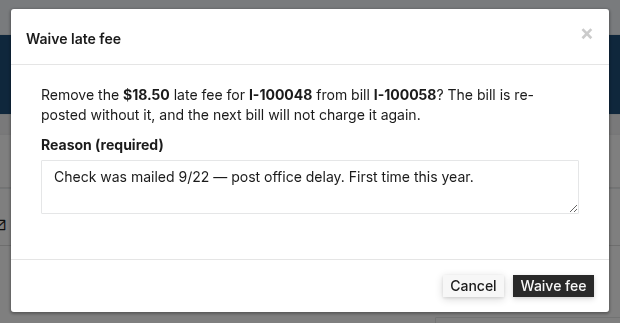
That's it. The bill's total drops by the fee, its balance drops with it, and if the fee was the only thing left owing, the bill is marked paid.
The waived row stays in Late fees charged for good, with the date and the reason, so there is always an answer to "why didn't this customer pay a fee in March?" On the bill itself, the fee no longer appears in the item list or in the Late fees line of the Account Summary, and a reprint shows the lower total.
What posts behind it
Nothing new is booked. The bill's draft journal entry is replaced by one without the fee line — the same as editing a bill and re-posting it. Continuing the $150 bill with a $15 fee:
| Account | Before | After | |
|---|---|---|---|
| DR | Accounts Receivable | 165.00 | 150.00 |
| CR | Sales | 150.00 | 150.00 |
| CR | Late Fee Income | 15.00 | — |
Because the entry is replaced rather than reversed, this only works while the period is open.
When it won’t let you
The bill's ledger entry is in a closed period. Reopen the period first. The bill posted into a month you have closed. Reopen it, waive, close it again — or leave the fee and credit the customer on the next bill.
The fee has already been paid ($165.00 applied to I-1042). Waiving it would leave a credit — refund or apply it instead. The message names the bill and what has been paid on it. Payments already cover the fee, so taking it away would leave the bill overpaid. Handle it as a refund or a credit.
This late fee has already been waived.
What this doesn’t do
A waiver forgives that one late bill. It does not exempt the customer from the next one — for that, set their Late fees to Exempt on the customer record. It also does not give money back; a fee that was already paid has to be refunded or credited.
The waived fee still counts as the fine for that lateness, so the next bill run will not charge it again.
Related
- How to set up late fees on recurring bills — the policy, and who gets charged
- What "balance forward" means on a BasicBMS bill
Stuck on this one? Call (509) 949-2162 and we'll walk through it with you.

Business software as unique as your business.
 Water Utility→
 Property Management→
 General Business→
 Construction soon
Don’t see yours? Build a vertical →
