What shipped
Your bill should show the whole balance. Your books shouldn’t have to lie to do it.
A member skips last quarter’s bill. This quarter’s bill says $150. They pay $150 and think they’re square. They owe $300.
The bill only knew about itself. And the late-payment policy printed at the bottom of it was just words: somebody had to notice who paid late, work out ten percent, and key a separate little invoice for every fee.
Both problems have the same fix, and almost everyone gets it wrong the same way.
The shortcut most systems take
To get the old balance onto the new bill, close the old bill and copy what was owed onto the new one as a line called “previous balance.” It looks tidy. It quietly breaks four things:
- The old bill reads Paid when no money came in.
- Aging shows a quarter-old debt as current, because it now lives on a bill dated today.
- A late fee has nothing honest to point at. Which bill was late? The one you just closed.
- When a backdated check turns up, you’re unwinding a transfer instead of applying a payment.
Close and forward
The old bill is marked paid and its balance is copied onto the new one. The bill looks right. The books are wrong.
What BasicBMS does
Every bill stays open until it is paid. The new bill shows what is still owed on the old ones. Nothing is closed, moved or copied.
What BasicBMS does instead
Every bill stays open on its own until it is paid. Accountants call this open-item. The old balance is never copied onto the new bill. It is shown, not booked, in an Account Summary under the charges.
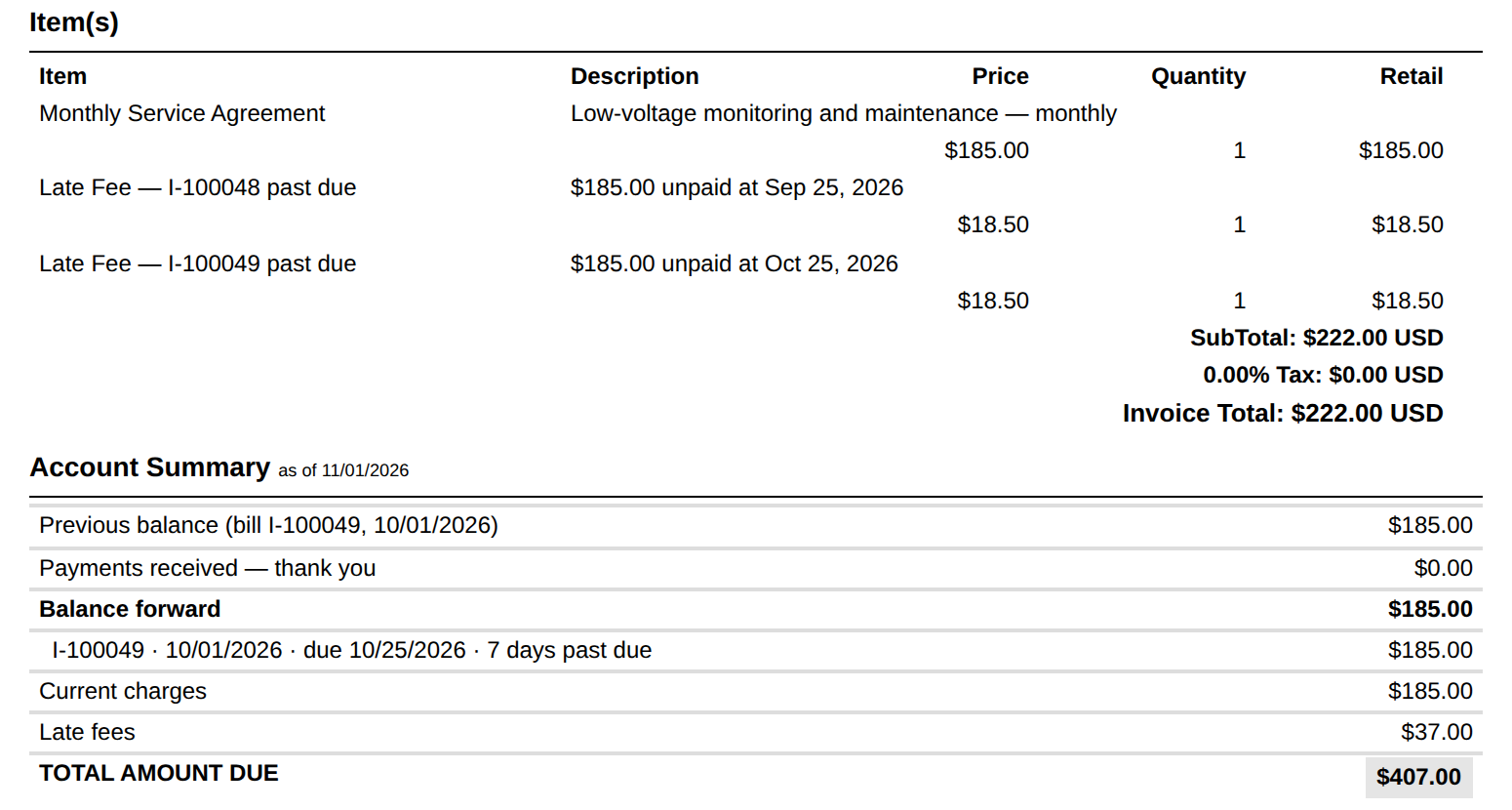
Read it top to bottom. The item list is this bill: one $185.00 service charge and two $18.50 late fees, $222.00. The Account Summary is the account: a $185.00 balance forward from I-100049, listed with its due date and days past due, plus this bill — $407.00 total amount due. On the demo tenant, that number matched the AR aging report for the customer on the bill date, to the cent. It has to; there is only one set of numbers underneath.
The Account Summary posts nothing. The $185.00 owed on I-100049 is in Accounts Receivable once, on the bill that created it — never twice. Everything in it is worked out as of the bill’s date, so a reprint next month reads the same as the paper you mailed.
Turning it on is one step: add the Account Summary section to the invoice layout in the form builder, after the item list. It prints on paper.
How each line is worked out: What “balance forward” means on a BasicBMS bill.
Shown on the bill. Booked once.
Late fees that charge for paying late
Because the late bill is still there, a late fee can point at it. Set the policy once, on Billing → Dashboard → Late Fees: when bills are due, any grace days, percent or flat amount or the greater of the two, a cap, and whether to charge once or every bill while it stays unpaid. When the customer’s next recurring bill is generated, every late bill gets its own line:
$185.00 unpaid at Sep 25, 2026
Two rules decide who pays, and both are on purpose:
- Paid late but caught up still counts. The fee is for paying late, not for owing now. Look at I-100048 above: paid in full since, and still charged.
- A payment counts on its own date, not the day somebody typed it in. A check dated the 24th and entered on the 3rd is on time.
A Start date keeps the policy from reaching back into old lateness. Preview the next run shows every customer who would be charged, and how much, before anything is. A customer can be set to Exempt. A fee can be waived with a reason, and the reason stays on the record.
Behind it, the fee is an ordinary line on the new bill, so it posts with that bill:
| Account | Debit | Credit | |
|---|---|---|---|
| DR | Accounts Receivable | 222.00 | |
| CR | Service Contract Revenue | 185.00 | |
| CR | Late Fee Income | 37.00 |
The late bills themselves are untouched. They stay open and keep aging.
Set it up: How to set up late fees on recurring bills. Take one back: How to waive a late fee.
What it doesn’t do. No reminders, no dunning letters, no shut-off notices, no reconnect fees. Nothing is charged between bills: the fee waits for the next recurring bill, so on a quarterly cycle it can land two months after the due date. Customers billed by hand are never charged automatically.
And no bill is ever closed, moved or re-dated to forward a balance. That’s the point.
Still modular
Start with what you run. Six core modules for $150 a month, $25 per add-on, every user included. Water utilities: $3 per hookup, $100 monthly minimum.

Business software as unique as your business.
 Water Utility→
 Property Management→
 General Business→
 Construction soon
Don’t see yours? Build a vertical →
